

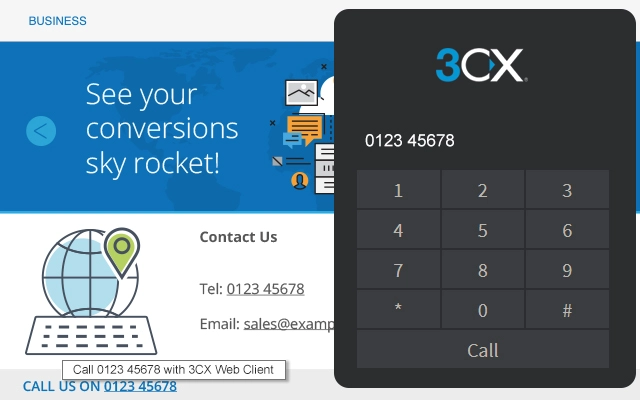
Description
Click-to-Call for 3CX Web Client
Overview
The 3CX Click to Call extension is designed to streamline communication workflows for users of the 3CX VoIP platform. By enabling direct dialing of phone numbers from web browsers and CRM systems, it eliminates manual data entry and reduces the risk of dialing errors. This tool is particularly useful for professionals in sales, customer support, and operations who frequently interact with client information across multiple platforms.
It integrates with the 3CX Web Client and supports detection of phone numbers on websites, emails, customer portals, and major CRM applications including Salesforce, SugarCRM, and Office 365. The extension automatically identifies numbers—both local and international—and allows users to initiate calls with a single click. This functionality enhances productivity by minimizing interruptions in workflow and enabling faster response times.
Target users include business teams relying on 3CX for unified communications, especially those managing high-volume client interactions. The extension is optimized for environments where speed and accuracy in communication are critical. It is available at no cost and requires 3CX version 15.5 or higher to function.
Key Features & Capabilities
- Phone Number Detection – Automatically identifies phone numbers on web pages, emails, and CRM interfaces, including international formats.
- Seamless CRM Integration – Works with Salesforce, SugarCRM, Office 365, and other popular customer relationship platforms.
- One-Click Dialing – Initiates calls directly from the browser via the 3CX Web Client without copying or pasting numbers.
- Customizable Exclusions – Allows users to define websites or pages where number detection should be disabled.
- Highlighted Contacts – Displays detected numbers with underlines and tooltips for quick identification.
- Advanced Web Meeting Support – Enables screen sharing and remote assistance during calls.
These features are especially effective in high-throughput environments such as call centers or sales teams managing numerous client touchpoints. For example, a support agent can instantly call a customer from a ticket detail page without switching applications. Similarly, a sales representative can respond to a lead’s inquiry immediately after viewing their profile in Salesforce. The extension reduces cognitive load and improves operational efficiency by integrating communication directly into existing workflows.
User Interface, Workflow & Performance
The extension features a minimal, non-intrusive interface that operates silently in the background. It does not alter the appearance of web pages or CRM dashboards, ensuring a clean user experience. Detection occurs automatically as content loads, and numbers are highlighted with underlines and tooltips upon hover.
Navigating through different web pages or CRM screens remains smooth and uninterrupted. The workflow is designed to be intuitive: users simply click a highlighted number to initiate a call via the 3CX Web Client. There is no need to configure complex settings or manage separate dialing windows.
Performance details were not specified by the developer. However, based on typical browser extension behavior, the extension operates efficiently with minimal impact on system resources. The 2.4 MB installation size suggests a lightweight footprint. Stability is expected to be consistent with the 3CX Web Client ecosystem, though specific crash reports or error logs were not provided.
Compatibility & System Requirements
The extension is compatible with Windows and Mac operating systems. It is designed to work with the 3CX Web Client and requires version 15.5 or higher of the 3CX platform to function properly.
Installation size is 2.4 MB, which is typical for browser extensions of this type. The developer did not specify exact system requirements such as RAM, CPU, or disk space. Compatibility with specific browsers was not mentioned, though it is likely designed for mainstream web browsers like Chrome, Firefox, and Edge given its integration with web-based CRMs and portals.
Platform compatibility information is limited to the operating systems listed. No additional hardware or software prerequisites were detailed.
Pros and Cons
Pros
- Eliminates manual number entry, reducing errors and saving time
- Seamless integration with major CRM platforms and web portals
- One-click calling via the 3CX Web Client enhances workflow continuity
- Supports international number detection and customizable exclusions
- Free to use with no licensing or subscription fees
- Enables advanced web meeting features like screen sharing
Cons
- Requires 3CX version 15.5 or higher, limiting use on older systems
- Compatibility with specific browsers was not confirmed
- No detailed system requirements provided for RAM, CPU, or disk usage
- Limited to users already operating within the 3CX ecosystem
- Dependent on stable 3CX Web Client connection for functionality
FAQ Section
Is the 3CX Click to Call extension free to use?
Yes, the extension is available at no cost. There are no subscription fees or hidden charges.
Which CRM systems does the extension support?
The extension integrates with popular CRM platforms such as Salesforce, SugarCRM, and Office 365. It is designed to work with any system that displays phone numbers in a web browser.
What version of 3CX is required to use this extension?
Version 15.5 or higher of the 3CX platform is required for compatibility.
Does the extension work offline?
No, the extension requires an active connection to the 3CX Web Client and a functioning internet connection to initiate calls.
Can I disable number detection on certain websites?
Yes, users can add specific websites or pages to an exclusion list to prevent automatic detection and highlighting of phone numbers.
Final Thoughts
The 3CX Click to Call extension delivers a practical, no-frills enhancement to the 3CX Web Client experience. Its ability to detect and dial phone numbers directly from web content significantly improves efficiency for teams managing frequent client interactions. The seamless integration with CRMs and support for international numbers make it a valuable tool for sales and support professionals.
While it is limited to users within the 3CX ecosystem, its free availability and straightforward functionality justify its adoption for any business already invested in the platform. The addition of web meeting features like screen sharing further strengthens its utility in remote collaboration scenarios.
For organizations aiming to reduce workflow friction and boost communication speed, this extension offers a reliable and cost-effective solution. Download 3CX Click to Call now.
Guides & Tutorials for 3CX Click to Call Extension for Chrome
How to install 3CX Click to Call Extension for Chrome
- Click the Preview / Download button above.
- Once redirected, accept the terms and click Install.
- Wait for the 3CX Click to Call Extension for Chrome download to finish on your device.
How to use 3CX Click to Call Extension for Chrome
This software is primarily used for its core features described above. Open the app after installation to explore its capabilities.
User Reviews for 3CX Click to Call Extension for Chrome 0
No reviews found





